

The Skyro calculator below is built for two different situations: planning before you apply, and checking the real cost of an offer after Skyro shows your approved monthly installment. If you do not have an approved offer yet, the tool estimates only the amount you may need to finance and Skyro’s usual origination-fee guide. It does not invent a monthly payment because Skyro says Product Loan interest is calculated daily from the remaining balance and the exact rate depends on the approved agreement.
If you already have a Skyro offer, enter the actual cash price, down payment, monthly installment, term, and any upfront charges not included in the monthly amount. The calculator will show your total out-of-pocket cost and how much more it may cost than paying cash. Gadget Sensei PH is a gadget merchant, not a bank, lender, or financing provider. Skyro independently decides eligibility, approval, rates, fees, and final loan terms.
Skyro Calculator Philippines
Use the planning mode before applying, check one approved offer, or compare two approved Skyro offers side by side. The calculator never creates an unofficial interest formula.
Plan your possible financed amount
Enter the gadget’s cash price and your planned down payment. Monthly payment is intentionally not estimated without a real Skyro offer.
- Planned financed amount
- ₱35,000
- Usual origination-fee guide
- ₱4,190
- Financed amount + usual fee
- ₱39,190
- Monthly payment
- Not estimated
- 6 months
- 9 months
- 12 months
- 18 months
- 24 months
Check your approved Skyro offer
Copy the actual figures shown by Skyro. This compares the entered offer against the gadget’s cash price.
- Total of monthly installments
- ₱42,000
- Down payment
- ₱5,000
- Other upfront charges
- ₱0
- Extra cost vs cash price
- ₱7,000
- Extra-cost percentage
- 17.5%
Compare two approved Skyro offers
Use this only when both sets of figures come from actual offers. The tool compares total out-of-pocket cost, not approval chances.
Offer A
Offer B
Skyro’s fees page currently shows 0% to 6.9% for Product Loans, while its Product Loan Help Center rounds the range to 0% to 7%. Skyro also says interest is calculated daily using the remaining balance. The exact rate, origination fee, add-ons, due date, and final monthly payment in your approved agreement control.
Jump to the main Skyro guide sections
Current Skyro Product Loan Terms in the Philippines
For gadget shoppers, the most relevant Skyro product is usually the Product Loan. Skyro says it can be used for appliances, gadgets, furniture, phones and other eligible products through partner stores. Current published terms include loan amounts from ₱3,000 to ₱100,000 and terms of 6, 9, 12, 18 or 24 months. The 18- and 24-month options are listed only for loans above ₱30,000. [1]
| Product Loan Detail | Current Published Information |
|---|---|
| Loan amount | ₱3,000 to ₱100,000 |
| Terms | 6, 9, 12, 18 or 24 months |
| 18- and 24-month eligibility | Published for loans above ₱30,000 |
| Interest | 0% to 6.9% on the Skyro fees page; Product Loan Help Center states 0% to 7% |
| Usual origination fee | 10% of financed amount + ₱690; exact amount can depend on loan details |
| Interest method | Calculated daily using the remaining balance |
| Down payment | Can be as low as ₱0 on selected approved deals; the final offer controls |
Is Skyro legit in the Philippines?
Skyro’s official terms identify Advanced Finance Solutions, Inc. as an SEC-registered financing company and Skyro Lending, Inc. as an SEC-registered lending company operating under the Skyro brand. This establishes that the service is operated by registered Philippine entities, but it does not mean every applicant will be approved or that every offer is automatically affordable. [2]
Product Loan
For eligible product purchases at Skyro partner stores. This is the main product covered by this calculator.
Cash Loan
A separate cash-loan product with different limits, terms, fees and eligibility.
SkyroCredit
A separate reusable credit feature that can be used for eligible QR Ph purchases.
SkyroPondo
An account inside Skyro used to prepare and make payments for supported Skyro obligations.
Do not mix the products: Product Loan, Cash Loan, SkyroCredit and SkyroPondo have different purposes and rules. The calculator on this page is designed for Skyro Product Loan planning and approved-offer comparison.
Skyro Requirements and Accepted IDs
Skyro currently states that a Product Loan applicant must be a Filipino citizen aged 18 to 70, have one accepted government-issued ID, a smartphone and a Philippine mobile number. Only one accepted ID is required for the application, although approval still depends on Skyro’s own evaluation and the final product/store details. [3]
- Filipino citizen
- 18 to 70 years old
- One accepted government-issued ID
- Smartphone
- Philippine mobile number
- Accurate application details
Government IDs currently listed by Skyro
- Philippine passport
- Driver’s license
- UMID
- SSS ID
- Philippine ID / PhilSys ID
- Digital National ID
- ePhilID
- PRC ID
- Postal ID
- GSIS ID
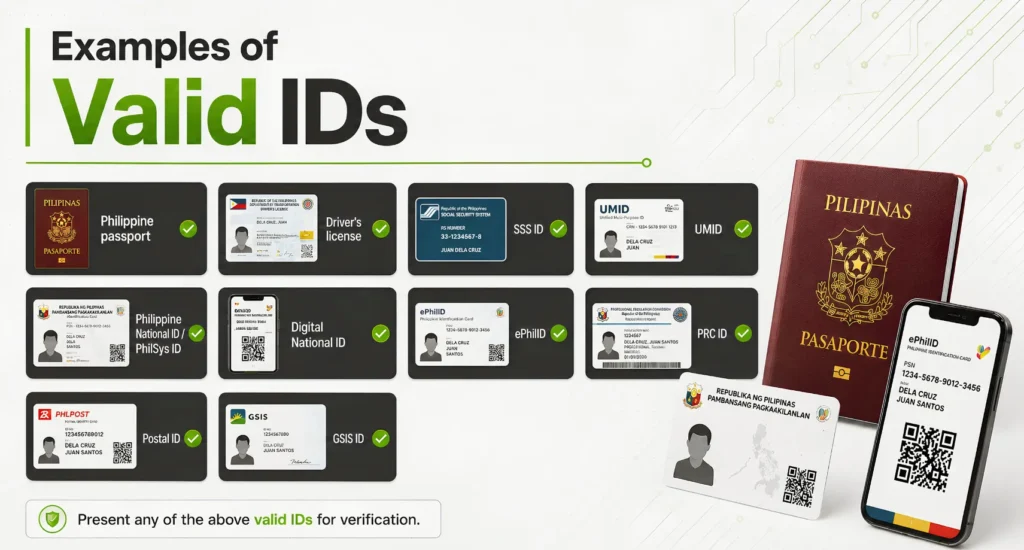
Application tip: Use your own valid ID and make sure your name and personal details match the information submitted in the Skyro app. A pre-approved status is not the same as final approval because the final decision can still depend on the selected product and store price.
How Skyro Installment Works for Phones and Gadgets
The exact screen flow can change, but the buying process is straightforward: choose the product, submit the application, review the approved offer, accept only when the monthly payment and total cost make sense, then track and pay the loan through Skyro.
Choose the exact gadget
Confirm the model, storage, condition, cash price, warranty and current stock before discussing installment.
Apply through Skyro
Submit the required details and one accepted ID through the official Skyro application flow.
Review pre-approval or eligibility
Pre-approval can help you continue, but final approval still depends on the selected product and store price.
Confirm the product and store
Use a supported partner-store process and make sure the product price in the offer matches the actual item you are buying.
Review the final agreement
Check the down payment, monthly installment, term, interest, origination fee, add-ons, due date and total repayment.
Complete the purchase
Proceed only after the approved terms and the gadget details are correct.
Track the loan in the Skyro app
Use the app to check the due date, amount due, loan status and available payment options.
How Skyro works at Gadget Sensei PH
Gadget Sensei PH can assist eligible customers with Skyro-supported gadget purchases, including selected brand-new and pre-owned devices. The store helps confirm the actual product, price, condition, warranty and stock, while Skyro independently handles the financing decision and final loan agreement.
Skyro Interest, Fees and Total Cost Explained
The most important improvement to this guide is how the monthly-payment question is handled. Skyro says Product Loan interest is calculated daily using the remaining balance. As the balance decreases, the interest charged also becomes smaller. Because the full day-by-day computation and account-specific rate are not published as one universal formula, an independent calculator should not pretend that one fixed percentage can accurately reproduce every Skyro monthly payment. [4]
Interest
Skyro’s official pages publish a Product Loan range around 0% to 6.9%/7%. Your exact approved rate is shown in the loan agreement.
Origination fee
Usually 10% of the financed amount plus ₱690. Skyro notes that the final origination fee can depend on the loan details.
Other charges
Transaction fees, value-added services, Flexi charges or conditional fees can affect the real amount you pay.
How to compare the real cost of an approved Skyro offer
Use the numbers shown in the approved offer, not a guessed interest rate:
Total scheduled installments = actual monthly installment × approved number of months
Total out-of-pocket = down payment + upfront charges not included in monthly + all scheduled installments
Extra cost vs cash = total out-of-pocket − cash price
Why a longer term can cost more
Skyro explains that interest adds up over time. A longer term means more days during which interest can be charged, so a lower monthly payment does not automatically mean a lower total cost. The correct comparison is always the cash price versus the complete approved repayment amount. [5]
How to Pay Skyro and What Happens If You Miss a Payment
Skyro currently supports both online and over-the-counter payments. The exact options visible to you can depend on the app and payment channel. Skyro’s Help Center lists SkyroPondo, QR Ph, online banking, supported e-wallets and Bills Payment options, plus over-the-counter partners. [6]
Online payment options
- SkyroPondo
- QR Ph
- BPI or UnionBank online banking when available
- GCash, Maya, GrabPay or PalawanPay when available
- GCash Bills Payment
- Other supported Bills Payment channels
Over-the-counter options listed by Skyro
- 7-Eleven / CLiQQ
- Cebuana Lhuillier
- ECPay partners
- M Lhuillier
- Palawan Pawnshop / Palawan Express
- The SM Store and other supported partners
Payment proof matters: Save your receipt or confirmation and check the Skyro app after payment. If you have multiple Skyro loans, some payment channels may route funds to SkyroPondo first, so follow the app’s instructions on whether a manual loan payment is still required.
Current Product Loan late-payment rule
Skyro currently states that if no Product Loan payment is made, the late-payment fee is ₱500 or 5% of the Net Proceeds of Loan, whichever is lower. Skyro also states that the fee may be charged again until the overdue balance is fully paid. Check your own agreement and monthly statement because they control the exact charge for your account. [5]
Can you pay Skyro early?
Skyro allows early-payment options, including full early repayment and other advance-payment methods. The exact full-settlement amount can depend on the day you pay, so check the amount shown in the Skyro app before sending payment. [4]
Using Skyro for iPhones and Gadget Purchases
Skyro can make a gadget purchase easier to manage when the monthly amount fits your real budget, but the product itself still matters. Before accepting financing for an iPhone, compare the device’s cash price, condition, storage, warranty, inclusions and current market value against the approved Skyro total.
Check the gadget first
- Exact model and storage
- Brand-new or pre-owned condition
- Cash price
- Warranty coverage
- Battery and unit details for pre-owned devices
- Current stock and color
Then check the approved Skyro offer
- Down payment
- Monthly installment
- Number of months
- Origination fee
- Add-ons and transaction charges
- Total amount you will pay
Gadget Sensei PH role: The store can confirm the unit, price, condition, stock, warranty and available merchant process. Skyro controls the financing approval and final agreement. Never treat a store-side product quotation as a guaranteed Skyro loan approval.
Is Skyro Worth It for Gadget Installment?
Skyro can be useful when the purchase is planned, the approved monthly amount fits your budget, and you understand the complete repayment. It becomes a weaker choice when you are focused only on getting approved or on making the monthly number look small.
Skyro may make sense if:
- You need the gadget for a real purpose
- You know the cash price first
- The monthly amount fits after regular bills
- You understand the fees and total repayment
- You can pay before every due date
- The financed device has clear warranty and seller support
Be careful if:
- You only looked at the monthly payment
- You have not compared the cash price
- Your monthly budget is already tight
- You may miss due dates
- You are adding optional services without checking the cost
- You are choosing a longer term only to lower the monthly amount
Simple buyer rule: Use the calculator to compare the total out-of-pocket cost, then decide whether the flexibility is worth the extra amount compared with paying cash.
Skyro vs Other Installment Options
Skyro is not the only way to spread a gadget purchase. The best option depends on where you are buying, the approved limit, the real monthly amount, fees, total repayment and whether you can consistently pay on time.
Atome
Useful for eligible short-term BNPL or Atome Card purchases. Compare the final amount shown by Atome with the cash price.
GGives
Useful for eligible GCash users and supported merchants. Approval, terms and rates depend on the offer inside GCash.
SPayLater
Best known for eligible Shopee purchases. Fees, interest, term and promos depend on the checkout offer.
Frequently Asked Questions About Skyro Philippines
Does Skyro have a calculator in the Philippines?
Yes. Skyro has an official product and application flow, and this Gadget Sensei PH calculator is an independent budgeting tool. Before approval it does not invent a monthly payment. After approval it can compare the actual monthly amount and term shown by Skyro against the gadget’s cash price.
How much can I borrow with a Skyro Product Loan?
Skyro currently publishes Product Loan amounts from ₱3,000 to ₱100,000. Approval and the final amount depend on Skyro’s evaluation and the product you choose.
What is the Skyro interest rate?
Skyro’s fees page currently lists 0% to 6.9% for Product Loans, while its Product Loan Help Center states 0% to 7%. The exact rate in your approved loan agreement is the figure that matters.
How is Skyro Product Loan interest calculated?
Skyro says Product Loan interest is calculated daily using the remaining balance. Interest for the period is added on the due date, and the interest charged becomes smaller as the balance decreases.
What is the Skyro origination fee?
Skyro says the Product Loan origination fee is usually 10% of the financed amount plus ₱690, but the final amount can depend on the specific loan details.
What are the requirements for a Skyro Product Loan?
Skyro currently says applicants must be Filipino citizens aged 18 to 70, have one accepted government-issued ID, a smartphone and a Philippine mobile number.
Can I pay Skyro using GCash?
Skyro currently lists GCash among supported e-wallet or Bills Payment routes. The exact steps and transaction fee depend on the payment method shown in the Skyro app. Save the receipt and confirm that the payment is reflected.
What happens if I miss a Skyro Product Loan payment?
Skyro currently states that if no Product Loan payment is made, a late-payment fee of ₱500 or 5% of the Net Proceeds of Loan, whichever is lower, may apply and may recur until the overdue balance is paid. Your agreement and monthly statement control the exact amount.
Official Skyro Sources Used for This Guide
Financial figures and requirements on this page are linked to Skyro’s own published pages so readers can verify current information directly with the financing provider.
- Skyro official fees page: Product Loan amount, interest range, terms, down payment, processing fee and conditional charges
- Skyro Product Loan payments and fees: interest method, origination fee and early repayment
- Skyro Product Loan application requirements and accepted IDs
- Skyro payment methods: online, e-wallet, banking, QR Ph and over-the-counter
- Skyro fees and charges: transaction fees, conditional charges and Product Loan late-payment rules
- Skyro Terms and Conditions: company and SEC registration information
Information can change: Skyro can update product amounts, rates, fees, payment channels, accepted IDs, terms, partner-store availability and application rules. The final offer and agreement shown to you by Skyro should always be treated as the account-specific source of truth.
Planning to Buy an iPhone or Gadget With Skyro?
Confirm the exact gadget, cash price, condition, warranty and stock first. Then use Skyro’s approved offer to compare the monthly payment and total out-of-pocket cost before proceeding.