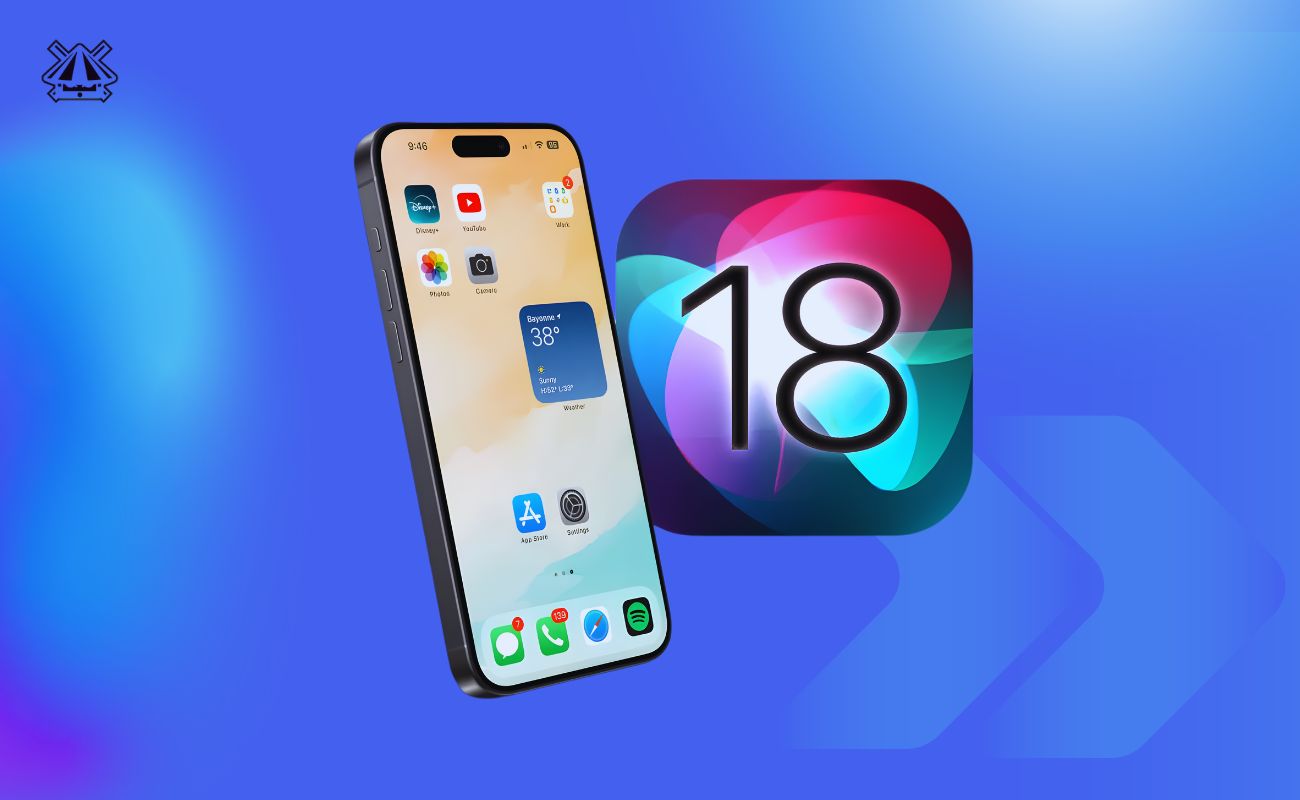
Apple’s latest iPhone software, iOS 18 Update, arrived in September 2024, bringing big changes to the iPhone experience worldwide. For Filipino iPhone users, the iOS 18 update adds fresh customization options, redesigned apps, and smarter AI features, while still addressing local concerns like battery life and data usage.
This news-style explainer breaks down what matters most to Philippines users: key features, design changes, performance improvements, security updates, supported models, and whether you should install the update now.
What’s new in iOS 18
iOS 18 focuses on personalization and intelligence. It lets you rearrange apps and widgets more freely, revamps core apps like Photos and Messages, and introduces the first wave of on-device AI (Apple Intelligence) on newer iPhones.
Several built-in apps get major updates: Photos now auto-creates dynamic slideshows, Messages supports richer text effects and (soon) cross-platform RCS messaging, and even Calculator gains a graphing mode.
Other headline features include a new stand‑alone Passwords app for managing logins, Game Mode (to boost gaming performance), and improved privacy controls.
Key highlights of iOS 18 include:
- Flexible Home Screen: You can move app icons anywhere on the grid, create empty spaces, make icons bigger (by hiding their labels), and even apply color tints. Widgets can be resized directly on the Home Screen.
- Redesigned Photos app: iOS 18 automatically generates “Memories” slideshows from your photos and videos. A new format improves HDR support across devices. Editing tools can now remove unwanted objects from images.
- New apps and tools: A dedicated Passwords app keeps all your website logins, passkeys, verification codes, and even Wi-Fi passwords in one place. The built-in Calculator app gains a “Math Notes” mode for handwritten input and graphing. The Journal app (introduced earlier) adds rich text formatting, search, and Home/Lock Screen widgets for quick entries.
- Messaging and calling: iOS 18 adds support for RCS messaging (richer texts with Android phones) and new animated text effects in Messages, though local carriers in the Philippines have not yet enabled RCS. The Phone app and maps get small updates too: for example, Maps adds more outdoor trail info where available. A new Game Mode can pause background tasks so your games run smoother with better frame rates.
- AI-powered features: On iPhone 15 Pro/Pro Max and iPhone 16 models, Siri and other apps gain “Apple Intelligence” tools. These include writing assistants (to rewrite or summarize your emails and notes), image generators (create sketches or illustrations from prompts), and a “Memories” movie maker in Photos that stitches your pictures into a video based on your description. (More on these below.)
Each of these changes adds up to a more personalized iPhone experience. In short, iOS 18 makes your iPhone feel more like your own: you can change how it looks and behaves, and on the newest models it can even learn to help with daily tasks.
Design and interface changes
Visually and interactively, iOS 18 lets you make the Home and Lock screens your own. You can now place app icons anywhere on the page grid, leaving blank rows or columns if you like. If you turn off icon labels, each app icon becomes larger.
(For example, you can hide app names to free up space and show bigger icons without changing how many fit on a screen.) In Dark Mode, Apple also gives system icons a new darker tint, and you can force colorful or monochrome icons depending on your preference.
On the Home Screen, widgets have small resize handles: just tap and drag the corner of a widget to shrink or expand it. The App Library remains, but you can also hide entire apps: hidden apps go into a new “Hidden” folder that only you can see (locked with Face/Touch ID).
If you want extra privacy, you can lock any app so it won’t open unless you authenticate.
The Control Center (the panel you pull down from the top) gets an overhaul, too. It now supports multiple pages: you can swipe to add sets of controls or turn on third-party app toggles if they provide them. Buttons are resizable and rearrangeable, so you can customize which shortcuts you see and how big they are.
Because of this, the Lock Screen shortcuts have also changed: you can now replace the default flashlight and camera icons with other controls (like Translator, Remote, or a shortcut you create). A new multicolor “rainbow” clock style for the Lock Screen time, and extra widget options (like a Journal writing prompt) add more personality as well.
Overall, the interface changes mean your iPhone can look and feel quite different after the update. You can emphasize the apps and tools you use most, and even make your phone reflect your style (for example, by applying icon color tints or a custom layout).
Performance and battery life
Under the hood, iOS 18 includes tweaks aimed at smooth operation and battery efficiency. A new Game Mode helps mobile gamers by minimizing background tasks (notifications and background app refresh) to keep frame rates steady during play.
Apple also introduced more detailed battery charts and Insights: after updating, your iPhone can tell you if a background update or setup is temporarily using extra power (for example, it may show an “Ongoing iOS Update” insight). This can explain any short-term battery drain so you can wait it out.
One important note for Filipinos with older iPhones: some performance tests have found that iOS 18 can make late-model devices run slightly slower under short bursts. Apple seems to have dialed back the peak CPU speeds on iPhones like the 14 Pro or 15 Pro Max to save power.
In practice, this means benchmarks may drop a few percent, but the phone should hold more charge. For most everyday tasks (social media, messaging, videos) the change is subtle, but power users on older handsets may notice a mild lag in heavy tasks right after updating. The trade-off is usually better battery life – a welcome gain for users concerned about all-day endurance on an aging phone.
Filipino users are also sensitive to data usage during updates. The iOS 18 installer is several gigabytes, so it’s best to download it over Wi-Fi. Once installed, iOS 18 can use some background data for indexing and updates. To avoid surprises, you can turn off mobile data for background apps in Settings or limit automatic downloads. Remember, using Wi-Fi saves both data and battery.
Privacy and security updates
Apple continues its emphasis on privacy in iOS 18. You now have more control over your apps and data. For example, you can lock any app with your passcode/FaceID so it won’t open without authentication – useful for banking or photos.
There’s also a new feature where hidden apps reside in a secure folder (invisible elsewhere on your phone) until you unlock them.
iOS 18 introduces a brand-new Passwords app, replacing the old Keychain section in Settings. This stand-alone app securely stores all your website logins, passkeys, two-factor codes, and even your saved Wi-Fi passwords. It’s much easier to find, edit, or change your passwords now.
For Filipinos, this means a single secure place for storing credentials – handy for those juggling multiple online accounts.
On the messaging front, iOS 18 supports RCS (Rich Communication Services) for compatible chats. In theory, this lets iPhones send higher-quality media and read receipts with Android users.
In the Philippines, however, local carriers (Globe, Smart) have not yet rolled out RCS support for iPhones, so iMessage will still fall back to standard SMS/MMS for Android contacts.
Under the surface, iOS 18 includes the latest security patches from Apple. Every iOS update fixes vulnerabilities that could allow hackers or malicious software to access data. Keeping your phone on the latest software is one of the best ways to stay protected.
Apple also continues to secure data with on-device encryption and the secure enclave, so personal information (photos, health data, messages) remains locked even if your phone is stolen.
In everyday terms, iOS 18’s privacy features help Filipinos manage data use: you can allow or deny apps from accessing contacts, photos, or your local network more easily. You’ll get more prompts if an app wants to do something sensitive.
The result is that you stay in control of who sees your information, making your iPhone safer to use for online work or social media.
AI and smart features
A big theme of iOS 18 is smart, AI-powered features, though most of these require the latest hardware. On iPhone 15 Pro/Pro Max and iPhone 16 series, Apple’s new Apple Intelligence system starts rolling out. Here are some key abilities introduced so far:
- Writing assistance: In apps like Mail, Notes, and Safari, iOS 18 can help improve your text. It can suggest rewording, summarizing, or even generating email responses for you. For example, if you’re drafting an email in Taglish, you could get grammar fixes or a shorter summary. (Of course, Apple processes this on-device to protect privacy.)
- Image Playground: You can ask the Photos app to generate new images or illustrations. Need a quick sketch of a “beach sunset in retro style”? The Image Playground can create it for you. (This is mostly for creative use, not replacing professional tools.)
- Photo Memories: Tell Photos what kind of memory you want (e.g., “Beach trip highlights with music”), and it will automatically pick your best photos and videos, add transitions and an optional text description, turning it into a short movie.
- Cleanup tool: In the Photos editor, there’s now a tool that can remove unwanted background objects (like bystanders or signposts) from pictures.
- Siri improvements: Siri can now be typed to (useful in meetings or quiet settings). Siri has also learned to be more conversational and can tap into ChatGPT for complicated queries (this arrived in iOS 18.2). You can even ask Siri to control media on another device (cross-device media control). In all, Siri aims to feel more helpful in daily tasks.
- Device integration: Future iOS 18 updates (18.3/18.4) will give Siri advanced cross-app abilities, like understanding what’s on your screen to execute commands. Some of these are still in development.
Keep in mind: these AI features only work on the latest iPhones. If you have an older model (iPhone 13 or 14, etc.), you won’t see these Apple Intelligence tools. For most Filipino users on older or midrange phones, iOS 18 will still bring Siri updates and photo editing tools, but not the full generative AI suite. However, these capabilities will gradually roll out to more regions and languages through 2025.
Supported iPhones
Apple iOS 18 is compatible with iPhones that use at least an A12 Bionic chip. In practice, this means every iPhone from the iPhone XS and XR (2018) onward. The full list of supported models is:
- iPhone XS, XS Max, XR
- iPhone 11, 11 Pro, 11 Pro Max
- iPhone SE (2nd generation, 2020)
- iPhone 12 mini, 12, 12 Pro, 12 Pro Max
- iPhone 13 mini, 13, 13 Pro, 13 Pro Max
- iPhone SE (3rd generation, 2022)
- iPhone 14, 14 Plus, 14 Pro, 14 Pro Max
- iPhone 15, 15 Plus, 15 Pro, 15 Pro Max
- iPhone 16, 16 Plus, 16 Pro, 16 Pro Max (2024 models)
- iPhone 16e (the just-announced lower-cost model).
In other words, iPhone 8 and 8 Plus (A11 chip) and older do NOT support iOS 18 and can’t be updated beyond iOS 17. If your iPhone is older than 2018, you’ll stay on iOS 17 or earlier. If you have one of the above newer iPhones, you can install iOS 18 through Settings > General > Software Update. It’s a free upgrade, but be sure to have enough free storage (the download is several gigabytes) and preferably be on Wi-Fi.
iOS 18 release timeline and availability in the Philippines
Apple announced iOS 18 at its Worldwide Developers Conference (WWDC) on June 10, 2024. Developer betas rolled out through the summer, followed by public betas. The final public release came on September 16, 2024, just before the new iPhone 16 launch. In the Philippines, iOS 18 became available overnight (it was September 17 in Manila due to time zones), so Filipino users could update by late September.
Since the initial release, Apple has steadily updated iOS 18 with smaller patches. By early 2025, versions like iOS 18.1 (October 2024), 18.2 (December 2024), and 18.3 (January 2025) added features or fixes (for example, 18.1 brought the first AI features to select iPhones). Further updates (18.4, 18.5, etc.) arrived over 2025 to expand Apple Intelligence to more languages, introduce new wallpapers, fix bugs, and tighten security. The latest version as of late 2025 is iOS 18.7, which mostly contains maintenance updates and is recommended for all users.
Filipino users should get the update through the normal Settings app. There’s no special regional delay — iOS updates are global. Once your iPhone is compatible, you’ll see iOS 18 listed under Settings > General > Software Update when it’s ready to install. Make sure your device is backed up and charged before upgrading.
How iOS 18 compares to iOS 17
iOS 18 builds on what iOS 17 offered, but with a different focus. iOS 17 (released 2023) introduced features like StandBy mode (clock display when charging), Live Voicemail, Contact Posters, and improved autocorrect. It was more about incremental enhancements and new apps (like Journal).
In contrast, iOS 18 is a larger step in customization and AI. iOS 18 lets you change the look of iOS 17’s interface in deeper ways (freeform icons, tinted themes, new Control Center pages). It also rolls out artificial intelligence tools that iOS 17 did not have. Many iOS 18 features (like freeform icon placement, password manager app, Apple Intelligence, RCS support) are brand new.
To sum up: iOS 17 polished many existing apps and features; iOS 18 revamps them. It feels more like a fresh coat of paint on the whole system. For users, that means everything from your photos to your home screen can look and work differently. Most apps from iOS 17 continue to work in iOS 18 (with updates from developers as needed), but you’ll notice the new interface options and app capabilities right away.
Should Filipinos update to iOS 18 now?
For most iPhone users in the Philippines, updating to iOS 18 is recommended, but with some caveats. The new features are compelling, and the security updates make your device safer. On the other hand, if you have an older iPhone or rely on it heavily right now, you might wait a little or prepare carefully.
Pros of updating:
- New features: You get all the iOS 18 enhancements – home screen customization, app redesigns (Photos, Passwords, etc.), and, on newer phones, AI tools. These can make your phone more useful and fun.
- Security fixes: Each iOS update patches vulnerabilities. Running the latest iOS 18 means your iPhone is protected against known exploits (important for banking, online work, etc.).
- Messaging and connectivity: iOS 18’s expanded Messages features and any future RCS support (when enabled by carriers) will improve texting with friends using Android.
- Better battery management: iOS 18’s background activity insights and adaptive power features (on supported devices) can help extend battery life on busy days.
- Future-proofing: iOS 18 is the current OS line; staying on it (instead of iOS 17) means you get support for longer and can upgrade to iOS 19 when it comes.
Cons of updating:
- Performance on older phones: If you have an older iPhone (especially iPhone 11, 12), iOS 18 might feel a bit slower or less responsive initially. Apple intentionally slows peak performance in some cases. You may notice this if you’re very sensitive to speed.
- Storage and data: The update is large (several GB). If you have limited free space or a slow internet connection, updating can be a hassle. You’ll want Wi-Fi access to download it.
- Minor bugs: Any big software update can have bugs at first. Usually Apple fixes these in the following weeks, but the earliest adopters might see occasional glitches (like app crashes) until the first patch.
- Incomplete features: Some iOS 18 features won’t fully work yet. For example, RCS texting needs local carrier support (not available in PH as of now). Similarly, any AI functions require the latest iPhones. If those are what you’re excited for, your device must be compatible.
- Learning curve: The new Home Screen layout and settings might feel unfamiliar at first. It takes a little time to re-learn where things are (e.g., moving Control Center panels or editing widgets on the fly). Most users adapt quickly, but it’s worth noting.
In practice, many tech outlets suggest that if your iPhone is one of the newer supported models and you care about the new features, go ahead and update. If your device is older, you might wait a couple of weeks to install after any first bug-fix update (like 18.1) is out. Always back up your iPhone to iCloud or a computer before upgrading, just in case you need to roll back.
iOS 18 in everyday use (Philippines perspective)
Overall, iOS 18 makes everyday iPhone use more personalized and intelligent, which will affect daily life in small ways. For Filipinos, here’s what to expect in normal routines:
- During commutes or on the go: Custom Lock Screen shortcuts (like Maps or Calculator) and widget tweaks can speed up common tasks. Maps’ new terrain info might be useful for weekend hikes or trips. If you have a CarPlay car, iOS 18 continues to support it (with a fix for wireless CarPlay if you had issues before).
- Online work and studying: New writing tools in Mail or Notes can help when drafting reports or essays. The Passwords app makes it safer to store login details for multiple school/work accounts. Improved Siri (especially typing queries) can set reminders or look up information hands-free.
- Social media and multimedia: The redesigned Photos app and AI-powered edits mean it’s easier to create fun content (like memory videos or cleaned-up pictures) for sharing on Facebook or Instagram. Widget sizing lets you put a trending news feed or weather widget front and center.
- Battery and connectivity: If your iPhone is older, iOS 18 might keep it alive longer on a charge — helpful in places with spotty signal. Just watch for extra data use right after the update, and use Wi-Fi where possible.
- Security and privacy: With stronger privacy settings, parents and professional users can feel a bit more secure that their apps and data are protected. Locking sensitive apps adds peace of mind if you carry work documents or financial info.
In summary, iOS 18 gives Filipino iPhone owners more flexibility and modern features. It won’t completely change daily routines, but it sharpens many small edges: your phone works a bit smarter and looks more like you want.
For most users, the update is a worthwhile upgrade that keeps the iPhone feeling fresh while reinforcing security. Whether it’s easier texting, a prettier home screen on the MRT, or Siri finally understanding your Tagalog‑English requests, iOS 18 aims to make the iPhone more helpful in everyday Filipino life.