

Skyro installment is one of the financing options in the Philippines that lets eligible customers buy gadgets, appliances, furniture, phones, and other items now, then pay over time.
For gadget buyers, this can be helpful if you want to manage your cash flow instead of paying the full price upfront. For example, instead of paying the full cash price of a phone or gadget right away, installment can split the cost into monthly payments.
But before applying, you should understand the requirements, fees, interest, payment terms, processing fee, due date, and final loan agreement carefully.
This Skyro installment guide explains how Skyro works, what requirements you may need, how much a sample monthly estimate could look like, how to use a Skyro calculator for budgeting, how to pay, and what to check before accepting any offer.
Important reminder: This article is for educational and budgeting purposes only. Actual Skyro approval, monthly payment, down payment, interest, fees, due dates, and terms may vary depending on your application, product, partner store, and final Skyro offer.
Always review the final in-app loan agreement before accepting.
Quick Answer: What Is Skyro Installment?
Skyro installment lets eligible customers split the payment of selected products over several months. It is commonly used for gadgets, appliances, furniture, phones, laptops, and other big-ticket items from partner stores.
Based on Skyro’s official Product Loan information, product loan amounts may range from ₱3,000 to ₱100,000, with terms such as 6, 9, 12, 18, or 24 months. The final offer still depends on approval, selected product, down payment, fees, interest, and your final loan agreement.
Skyro installment is best for:
- Buyers who want to spread payment over time
- Gadget buyers who do not want to pay full cash upfront
- Customers who can handle monthly payments responsibly
- People buying from a Skyro partner store or supported merchant
- Buyers who check total repayment before accepting
Be careful if:
- You are unsure about your monthly income
- You may miss due dates
- You only checked the monthly payment but not the total repayment
- You have not reviewed the final loan agreement
- You are already struggling with monthly bills
Simple verdict: Skyro can be useful for planned purchases, but it is still a loan. Do not treat it as free money or an automatic discount.
Updated Skyro Installment Details 2026
Here are the important Skyro Product Loan details to check before applying.
| Skyro Product Loan Detail | What To Know |
|---|---|
| Loan amount | Around ₱3,000 to ₱100,000 |
| Interest | May start from 0% and can go up depending on the final offer |
| Terms | 6, 9, 12, 18, or 24 months |
| Longer terms | 18 and 24 months may only apply to higher loan amounts |
| Down payment | Can be as low as ₱0 if qualified |
| Processing fee | Usually based on the financed amount and loan details |
| Where to use | Partner stores, including gadget and appliance merchants |
| Final amount | Always check the final Skyro offer before accepting |
Trust note: Do not treat any sample computation online as your final monthly payment. The only final numbers are the ones shown in your approved Skyro offer and loan agreement.
How Skyro Installment Works
The basic Skyro installment process usually looks like this:
How Skyro Installment Usually Works
Here is a simple step-by-step process for buyers who want to use Skyro installment for a gadget, phone, laptop, appliance, or other supported product.
- Choose a product from a partner store or supported merchant.
- Select Skyro as the financing or installment option if it is available for that product or merchant.
- Choose your loan amount and installment term based on the available Skyro offer.
- Submit your application and valid ID through the required Skyro process.
- Wait for approval through SMS, email, call, or the Skyro app.
- Review the final loan details, including loan amount, monthly payment, fees, due date, interest, and terms.
- Sign the agreement only if you accept the final offer and understand the total repayment.
- Pay any required down payment through the correct Skyro payment channel.
- Track and pay your monthly dues through the Skyro app or supported payment methods.
Sample Gadget Sensei PH flow
For example, a customer can browse Gadget Sensei PH products first, choose the device they want, then ask our team if Skyro or another installment option is available for that specific item.
- Browse Brand New Devices →
- Browse Pre-Owned iPhones →
- Check iPhone 16 Brand New →
- Check iPhone 17 Pro Max →
- Pick the product you want
- Ask if installment is available
- Review the final Skyro offer before accepting
Important: this is only a sample process. Final approval, down payment, monthly payment, processing fee, interest, due date, and total repayment still depend on Skyro’s final loan agreement and the supported merchant or product.
Important: Approval is not guaranteed. Your final monthly payment may change depending on your application, product price, selected term, down payment, fees, and final Skyro offer.
Also, seeing an estimate or sample computation does not mean that exact amount is already approved. The final loan disclosure is what matters.
Skyro Installment Requirements
To apply for Skyro, you may need:
Filipino citizenship
Age requirement, usually 18 to 70 years old
One valid government-issued ID
Smartphone
Philippine mobile number
Completed application details
Approval from Skyro
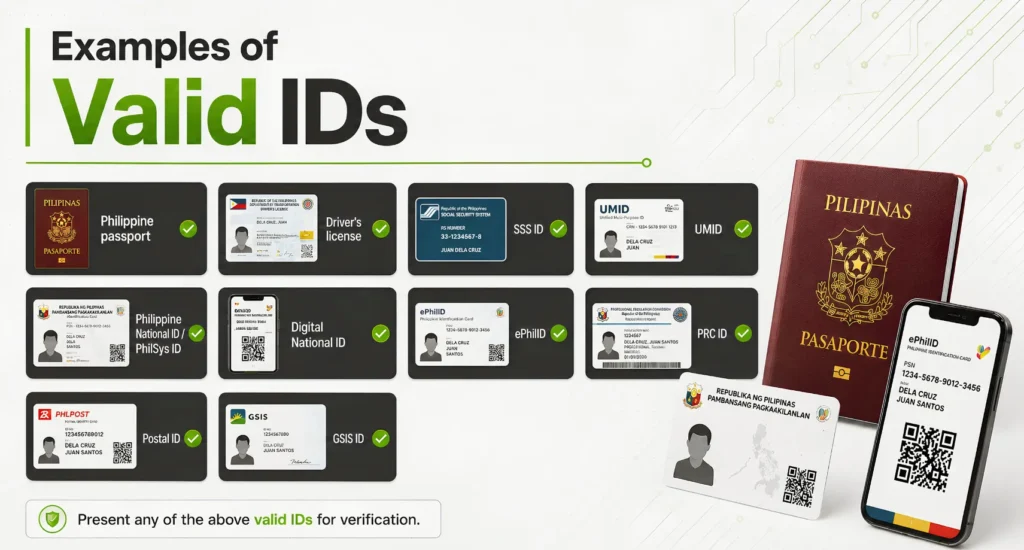
Examples of valid IDs may include:
Primary IDs
- Philippine passport
- Driver’s license
- UMID
National ID Options
- Philippine National ID / PhilSys ID
- Digital National ID
- ePhilID
Other Government IDs
- SSS ID
- PRC ID
- Postal ID
- GSIS ID
Important: make sure the ID is valid, clear, readable, and matches the name used in the application.
Tip: Make sure your ID is clear, readable, and not expired. Bad ID photos, wrong names, expired IDs, or mismatched details can slow down or hurt your application.
Do not submit incorrect information just to “try.” Loan apps check consistency, and wrong details may cause delays or rejection.
Estimated Skyro Installment Calculator
Use this section as a budgeting guide only.
This calculator section is meant to help readers estimate how monthly payments could look based on product price, down payment, term, and sample fee assumptions. It should not be treated as an official Skyro calculator, final loan offer, or guaranteed monthly payment.
Actual Skyro interest, down payment, fees, approval, due date, and terms can vary depending on the final offer.
Skyro Calculator Inputs
The Skyro installment calculator can include these fields:
| Input | Purpose |
| Product price | The gadget or item price |
| Down payment | Amount the customer may pay upfront |
| Loan term | 6, 9, 12, 18, or 24 months |
| Estimated interest / rate assumption | Editable estimate only |
| Estimated processing fee | Editable or clearly shown as a sample assumption |
Recommended calculator note:
“Use this calculator for budgeting only. Final Skyro approval, fees, interest, down payment, and monthly payment may vary.”
Skyro Calculator Outputs
The calculator can show these results:
| Output | Meaning |
| Estimated financed amount | Product price minus down payment |
| Estimated monthly payment | Approximate monthly cost |
| Estimated total repayment | Approximate total amount paid over the term |
| Estimated total cost difference | Difference versus paying full cash |
Sample Calculator Formula For Estimate Only
Here is a simple estimate formula you can use for the article while the actual calculator app is still being made.
Estimated financed amount
Product price – Down payment
Sample estimated processing fee
10% of financed amount + ₱690
Sample estimated interest amount
Financed amount × sample interest assumption
Estimated total repayment
Financed amount + estimated processing fee + sample estimated interest amount
Estimated monthly payment
Estimated total repayment ÷ loan term
Important: This is not an official Skyro computation. This is only a simple budgeting estimate. The real Skyro computation may be different depending on the final approved offer.
Sample Skyro Monthly Payment Examples
These examples use a sample assumption only:
Sample processing fee: 10% of financed amount + ₱690
Sample interest assumption: 3.9% of financed amount
Sample purpose: budgeting estimate only
These are not final Skyro-approved amounts.
| Sample Gadget Price | Sample Down Payment | Sample Term | Estimated Financed Amount | Sample Estimated Monthly Payment | Reminder |
| ₱10,000 | ₱0 | 6 months | ₱10,000 | Around ₱2,013/month | Check final Skyro offer |
| ₱15,000 | ₱1,500 | 9 months | ₱13,500 | Around ₱1,785/month | Actual fees may vary |
| ₱20,000 | ₱2,000 | 12 months | ₱18,000 | Around ₱1,766/month | Review total repayment |
| ₱35,000 | ₱5,000 | 18 months | ₱30,000 | Around ₱1,937/month | Longer terms may cost more overall |
| ₱50,000 | ₱10,000 | 24 months | ₱40,000 | Around ₱1,927/month | Check agreement before accepting |
These examples are only meant to show how price, down payment, and term can affect the estimated monthly payment.
Your actual Skyro monthly payment may be higher or lower depending on approval, final interest, fees, loan term, due date, partner store, and final loan agreement.
Skyro Installment Calculator
Gadget Sensei PH Budgeting Tool
Skyro Installment Calculator
Estimate your possible monthly payment before applying. This is for budgeting only and not an official Skyro quote.
Calculator Inputs
Default sample assumption: processing fee is 10% of financed amount + ₱690, with 3.9% sample interest.
Select Term
Estimated Monthly Payment
for 12 months
Estimate
Only
Estimated Monthly Payment by Term
Shorter terms usually have higher monthly payments. Longer terms may feel lighter monthly, but always check the final total repayment.
Use this calculator to estimate your possible monthly payment before applying.
Calculator fields to add:
Product price
Down payment
Loan term
Estimated interest rate
Estimated processing fee
Calculator results to show:
Estimated financed amount
Estimated monthly payment
Estimated total repayment
Estimated total cost difference versus cash price
Important disclaimer to show under the calculator:
This calculator is for sample budgeting only and does not represent an official Skyro quote, approval result, or final loan disclosure. Actual monthly payments, fees, down payment, interest, due dates, and terms may vary depending on your application, selected product, partner store, and final Skyro offer. Always review the final in-app loan agreement before accepting.
Estimated Monthly Payment By Term
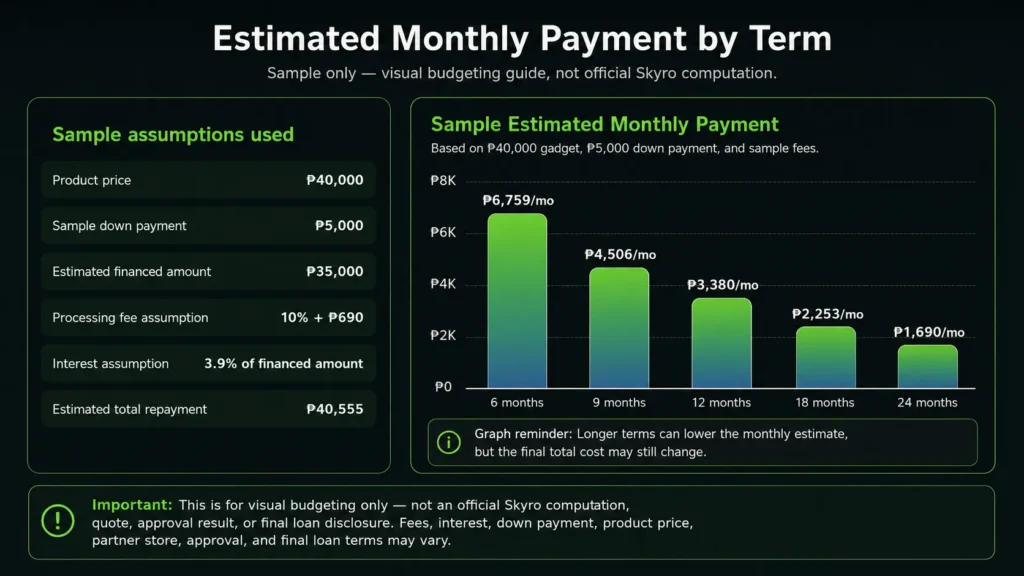
Below is a sample estimate showing how the monthly payment may look different depending on the selected term.
Sample assumptions:
| Detail | Sample Amount |
|---|---|
| Product price | ₱40,000 |
| Sample down payment | ₱5,000 |
| Estimated financed amount | ₱35,000 |
| Sample processing fee assumption | 10% of financed amount + ₱690 |
| Sample interest assumption | 3.9% of financed amount |
| Estimated total repayment used | ₱40,555 |
| Sample Term | Sample Estimated Monthly Payment |
|---|---|
| 6 months | Around ₱6,759/month |
| 9 months | Around ₱4,506/month |
| 12 months | Around ₱3,380/month |
| 18 months | Around ₱2,253/month |
| 24 months | Around ₱1,690/month |
Graph reminder: Shorter terms usually look heavier monthly, while longer terms may feel lighter per month. However, the final total cost may still change depending on Skyro’s approved interest, processing fee, down payment, product price, partner store, and final loan agreement.
Important disclaimer: This graph is for visual budgeting only. It is not an official Skyro computation, quote, approval result, or final loan disclosure. Always check the final in-app loan agreement before accepting any Skyro offer.
Skyro Interest, Fees, And Charges
Before accepting any Skyro installment offer, check the full cost, not only the monthly payment.
Things to review:
Product price
Down payment
Financed amount
Monthly payment
Interest rate
Processing fee
Other charges
Due date
Late payment fee
Total repayment amount
Whether any add-ons or services are included
Important buyer reminder:
A lower monthly payment does not always mean the deal is cheaper. Longer payment terms can make the monthly payment easier, but the total repayment may be higher depending on the final interest, fees, and charges.
For example, a 24-month term may look lighter monthly than a 6-month term, but you should still compare the full repayment amount before accepting.
Skyro Payment Methods
Skyro payments may be available through different channels such as:
SkyroPondo
QR Ph
Online banking
E-wallet
Over-the-counter payment
Other supported payment channels shown in the Skyro app
For GCash or e-wallet payments, follow the official Skyro app instructions. Do not send payment to random personal accounts, unofficial QR codes, or people claiming they can “process” your payment outside the official system.
Payment safety tips:
Pay through the official Skyro app or supported channel
Check the exact amount before sending
Save your proof of payment
Pay early when possible
Confirm if the payment has posted
Avoid unofficial pages or agents
Do not trust random QR codes from strangers
If your due date is near, it is safer to pay early instead of waiting until the last day.
Skyro For iPhone And Gadget Installment
Skyro may be useful for customers who want to buy phones, tablets, appliances, or other gadgets through installment instead of paying full cash upfront.
For iPhone or gadget buyers, check these before applying:
Is the store a legitimate partner or trusted merchant?
Is the product price fair compared to cash price?
How much is the final monthly payment?
Is there a down payment?
What is the total repayment?
Are there fees or add-ons?
Can you comfortably pay every month?
What happens if you miss a due date?
Gadget Sensei PH tip:
Do not choose installment only because the monthly payment looks small. Always compare the total cost versus the cash price.
If the total repayment becomes too high, it may be better to choose a lower-priced model, pay a bigger down payment, wait for a promo, or consider a checked pre-owned device instead.
You can compare brand new iPhones and pre-owned iPhones before deciding if installment is really the best option for your budget.
Skyro Vs Home Credit Vs Atome Vs Shopee PayLater
Different payment options work better for different buyers. Do not choose based only on brand name. Compare the final offer, monthly payment, fees, and total repayment.
| Payment Option | Best For | Strength | Risk |
| Skyro | Gadget and big-ticket installment buyers | Flexible installment terms and partner store usage | Final fees and monthly payment may vary |
| Home Credit | In-store gadget and appliance installment | Popular and widely known | May have different fees, terms, and approval rules |
| Atome | Short-term buy now, pay later users | Useful for smaller purchases and short repayment cycles | Not always ideal for bigger gadget purchases |
| Shopee PayLater | Shopee buyers | Convenient inside Shopee | Can encourage overspending if not controlled |
Best approach:
Choose the option with the clearest total cost, manageable monthly payment, trusted merchant, and terms you fully understand.
You can also read:
Atome Buy Now Pay Later Philippines
GGives in GCash Guide
Shopee PayLater Philippines
Is Skyro Good For Installments?
Skyro can be good for installments if:
You are approved
The monthly payment fits your budget
The total repayment is acceptable
You understand the fees and due dates
You are buying from a trusted store
You are confident you can pay on time
Skyro may not be good for you if:
You are already struggling with monthly bills
You only look at the monthly amount
You do not check the total repayment
You are unsure about your income
You may miss payment deadlines
You are buying something more expensive than you actually need
Honest verdict:
Skyro can be useful, but it should be treated as a financial commitment, not free money.
If you are not confident that you can pay on time, it may be safer to delay the purchase or choose a cheaper item.
Pros And Cons Of Skyro Installment
Pros
- Can help spread big purchases over time
- May offer flexible terms
- Can be useful for gadgets and appliances
- Application may only require one valid ID
- Some qualified offers may have low or zero down payment
- Payments can be tracked through the app
- Can help buyers manage cash flow for planned purchases
Cons
- Final approval is not guaranteed
- Monthly payment may differ from sample estimates
- Fees and interest can affect the total cost
- Late payment fees may apply
- Longer terms can make the total cost higher
- Not ideal for buyers with unstable monthly income
- Not every store or merchant may support Skyro
- Low monthly payment can hide a higher total repayment
Important: Skyro installment can be useful for planned purchases, but always check the final monthly payment, total repayment, fees, interest, due date, and loan agreement before accepting.
Trust Checklist Before Accepting A Skyro Offer
Before signing or accepting any Skyro installment offer, check this:
Is the merchant trusted?
Is the product price fair?
Is the down payment clear?
Is the monthly payment clear?
Is the interest rate clear?
Is the processing fee clear?
Is the due date clear?
Is the total repayment amount shown?
Are there any add-ons or extra services?
What happens if you pay late?
Can you afford the monthly payment without hurting your essentials?
Did you read the final loan agreement?
Simple rule:
If the final total repayment feels too high, do not accept just because the monthly payment looks affordable.
Common Mistakes When Using Installment
Avoid these mistakes:
- Only checking the monthly payment
- Ignoring the total repayment amount
- Not checking fees
- Not checking the due date
- Applying without stable income
- Buying a more expensive gadget than needed
- Not comparing cash price vs installment cost
- Missing payment reminders
- Trusting unofficial pages or agents
- Accepting without reading the final agreement
For gadget buyers, the most common mistake is focusing only on “monthly magkano?” instead of asking “total magkano lahat?”
That is the difference between a smart installment decision and a stressful one.
What Happens If You Miss A Skyro Payment?
If you miss a Skyro payment, late payment fees or other charges may apply depending on your loan type and agreement.
This is why you should only apply if you are confident you can pay on time.
Before applying, ask yourself:
Can I pay this monthly even during slow months?
Do I have emergency funds?
Is this gadget necessary now?
Is there a cheaper alternative?
Can I pay a bigger down payment to reduce monthly cost?
What happens if I miss one due date?
Do not treat the due date as optional. A missed payment can make the loan more expensive and stressful.
Skyro No Down Payment: Is It Always Better?
Not always.
A low or zero down payment offer can make it easier to bring home a gadget, but it can also mean you are financing a bigger amount. That may increase your monthly payment or total repayment depending on the final terms.
A down payment can be helpful because:
It lowers the financed amount
It may lower monthly payment
It can reduce total cost depending on the offer
It can make the payment plan easier to manage
It shows stronger commitment to the purchase
Best mindset:
Do not choose zero down only because it feels easier today. Check if the monthly payment and total repayment still make sense.
Sometimes paying a down payment is smarter because it lowers the amount you need to finance.
Should You Use Skyro Installment?
Use Skyro installment only if the final offer fits your real budget.
Skyro may make sense if:
- You are buying a planned item
- You understand the loan terms
- You checked the processing fee
- You checked the total repayment
- You can pay every due date
- You are buying from a trusted store
- The monthly payment fits your budget
Avoid Skyro if:
- You are already short on money
- You are unsure about monthly income
- You are only attracted by low monthly payment
- You have not checked the total cost
- You may miss due dates
- You are buying something you do not really need
Simple reminder: a gadget upgrade should make life easier, not create monthly stress.
Final Verdict
Skyro installment can be useful for Filipino buyers who want to buy gadgets, appliances, phones, or other big-ticket items without paying the full price upfront.
However, it is still a financial commitment. Before accepting any offer, check the monthly payment, total repayment, interest, processing fee, due date, late payment rules, and final agreement.
For Gadget Sensei PH readers, the smart move is simple:
Use Skyro only if the final monthly payment fits your budget, the total repayment makes sense, and you fully understand the terms before signing.
Do not rely only on sample estimates, online comments, or calculator results. Always check the final approved Skyro offer inside the app or official process before accepting.
Frequently Asked Questions
How to avail Skyro installments?
You can avail Skyro installment by choosing Skyro from a partner store or supported checkout option, submitting your application, uploading one valid ID, waiting for approval, reviewing the final loan offer, then signing the agreement if you accept the terms.
How much is the interest for Skyro?
Skyro Product Loan interest may vary depending on the final offer. Some offers may start from 0%, while other offers may have interest depending on the product, term, approval, and agreement. Always check the interest rate, processing fee, monthly payment, and total repayment in your final Skyro agreement before accepting.
Is Skyro no down payment?
Skyro may offer low or zero down payment to qualified customers, but it is not guaranteed for everyone. Your final down payment depends on approval, product, partner store, and the final Skyro offer.
What are the payment methods for Skyro?
Skyro payments may be made through supported channels such as SkyroPondo, QR Ph, online banking, e-wallet, and over-the-counter options. Always check the Skyro app for the correct payment method.
Is Skyro good for installments?
Skyro can be good for installment buyers who understand the fees, due dates, monthly payment, and total repayment. It is not ideal if you are unsure about your ability to pay monthly.
Which is better, Home Credit or Skyro?
It depends on the final offer. Compare the monthly payment, total repayment, fees, approval terms, partner store, and payment flexibility before choosing between Home Credit and Skyro.
Can I borrow money from Skyro?
Skyro has different products, including product loans and cash loans. A product loan is for buying selected items through partner stores, while a cash loan is different and may have separate terms, fees, and approval rules.
Is Skyro good for iPhone installment?
Skyro may be useful for iPhone installment if the store accepts it, the final monthly payment is affordable, and the total repayment is acceptable. Always compare the installment total against the cash price before accepting.
Is the Skyro calculator exact?
No. Any calculator on this article is only for sample budgeting. Your final monthly payment, fees, down payment, interest, and total repayment may change based on your final approved Skyro offer.
Should I use Skyro if the monthly payment looks low?
Not automatically. A low monthly payment can still have a higher total repayment depending on interest, fees, and term length. Always check the total repayment and final agreement before accepting.